Every blogger should do this every now and then; check which search queries have driven traffic to your site. I’ve just checked the Keywords report in Google Analytics and actually, I’m pretty happy with the results. Of course, I also found some bizarre keywords in there, here’s my Top 5 of 2009 so far:
be doddema (I must admit, I kinda like this one.)
display two comments (Not three or four?)
lili aaron soundtrack (Who’s Lili Aaron?)
overload on homework (I’ve had my fair share of homework, and I wasn’t able to handle an overload either.)
If you’re into photography, you’ve probably been following the announcement of the Olympus E-P1 with some excitement. I know I have! The E-P1 is not a compact, nor an SLR, it’s a Pen; A small camera with interchangeable lenses. The Olympus E-P1 is a Micro Four Thirds camera that, among other things, features 12.3 megapixels, 720p HD video shooting at 30fps, built-in image stabilization, and art filters.
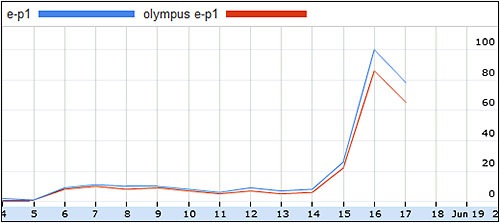
Whether you’re happy (Love the size and the retro look!) with the camera or not (You’re kidding, no viewfinder and no flash?), you’ve got to hand it to Olympus’ PR and Marketing departments, they executed on a good web strategy. The E-P1 launch was fun. They’ve been teasing us for quite a while since the mock-up first appeared at Photokina in September 2008; Mysterious tweets by @getolympus, the videos commemorating the Olympus Pen from 1959, the invitations to the Berlin event, and the sudden involvement of Blendtec. It doesn’t happen very often, but the web was full of Olympus buzz!
So, what’s been causing all of the buzz? Here’s a short recap of the most important rumors and events:
19-4-2009: This is the mock-up camera that was shown at Photokina 2008. A prediction of the camera’s specs is made on 43rumors.com, where else?
29-5-2009: Rumors of the camera’s name emerge on a Korean forum: E-P1 (via 43rumors.com).
1-6-2009: Sketches of the camera’s front are published at 43rumors.com.
2-6-2009: Olympus invites prominent journalists and bloggers to a Micro Four Thirds event in Berlin held on the 15th and 16th of June.
4-6-2009: Sketches of the back of the camera appear on 43rumors.com.
5-6-2009: The first real picture of the camera is leaked, photography enthusiasts on the web are getting excited.
11-6-2009: A very tiny image (120×90 pixels) of the camera and the kit lenses appears on a Chinese forum (via 43rumors.com).
15-6-2009: Stock images of the Olympus E-P1 leak all over the web. Some photoshop the images and add a black model to the line-up.
16-6-2009: The camera is officially announced by Olympus and goes on pre-order at camera retailers worldwide.
It’s been an interesting launch, and so far, mosthands-onpreviews of the camera seem to be in Olympus’ favor. But, what will the pixel-peeping reviewers have to say about the camera? What are your first impressions?
The other day, I purchased a Canon Canonet QL17 G-III from eBay. The Canonet QL17 is a classic, fixed-lens rangefinder camera from the 1960s-70s and widely regarded as one of the best compact rangefinders out there. However, the seller informed me that the light seals require replacement. He was definitely right, the light seals had deteriorated and turned into a gummy, sticky mess. Other than that, the camera is in excellent cosmetic condition and in full working order, I’m looking forward to using it!
Replacing light seals can be a bit daunting, it’s a fiddly process that includes some trial and error. So, take your time and be patient. However, I noticed that the whole replacement process can also be very rewarding, I couldn’t escape from feeling a good sense of achievement after restoring my Canonet QL17 G-III to its former glory. Heck, if this isn’t connecting with a camera, then I don’t know what is!
Without representing myself as a camera repair expert, here’s how to replace the camera light seals:
Buy a light seal replacement kit, I got mine from Camera Repair Materials. It has everything you need: self-adhesive and non-adhesive foam (3mm and 5mm thick), self-adhesive felt, 10ml of adhesive glue, 10ml of adhesive remover and a pair of tweezers. Don’t worry, you’ll get plenty of foam with this kit, it’s okay to make mistakes and waste some.
Read the instruction manual! Read it from start to finish and preferably twice. There’s a good, elaborate manual at Favorite Classics, Matt Denton also has some tips and tricks.
Put a few drops of adhesive remover onto the light seal and let it soak in.
Add a few more drops and start scraping! Use the wooden scrapers and cotton buds.
I know it’s tempting to leave a few bits of the old light seals on, but please continue until everything has been cleaned away!
I cut approximately 7×13,5 mm of foam for the lower part of the film chamber door and 3,5×13,5mm for the upper part. Please do take your own measurements as well! It’s better to cut out a piece that’s slightly too large than a piece that’s too small.
Gently place the new seals onto the camera with the pair of tweezers. If you’re using the self-adhesive foam, note that it’s very, very sticky, you may have to lick it before you stick it.
Well, that’s about it, no more bullet points!
Done! I did notice that the camera back closes very tightly, but I figured it’ll be fine when the newly placed foam compresses after a while.
Just discovered a nice little Android application for WordPress: wpToGo. Handy for blogging on the go, yet very simple to use. It supports images, tags, and categories, you can save and load drafts, and you can add multiple blogs you author.
This post was written with wpToGo, seems to be working just fine! You can download it for free from the Android Market.
Recently, I bought two manual focus Olympus OM lenses on eBay, the 50mm f/1.8 and 28mm f/3.5. Nothing spectacular, but I was impressed with the optical quality, and solid build of these lenses, they’re just good bang for the buck. Yes, the Olympus OM 50mm f/1.8 is perhaps even better than the Canon 50mm f/1.8!
The day after, I ordered some OM to EF mount adapters with focus confirmation from BIG_IS. The focus confirmation works fine, however, I noticed that when I attached the lens to the adapter, the lens was slightly loose on the adapter and could move around a bit while focusing.
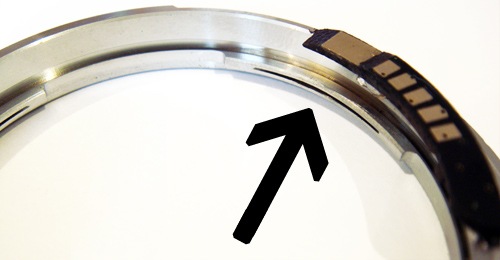
I contacted the seller about it and learned this little hack: There are three small grooves on the adapter’s mount, if you use a tiny screwdriver to widen these grooves just a little bit, the OM lens will fit the adapter more tightly. Be careful though, don’t widen them too much or it’ll be very hard to dismount the lens from the adapter again. See the image below, it works!
HansLoose Lens with Olympus OM to Canon EF Adapter?